

- Mapping features to data and endpoints
- Implementing asset features reliably
- Migrating from the legacy Embed API to the Assets API
country: an ISO 3166-1 alpha-2 code that applies that country’s geo restrictions.
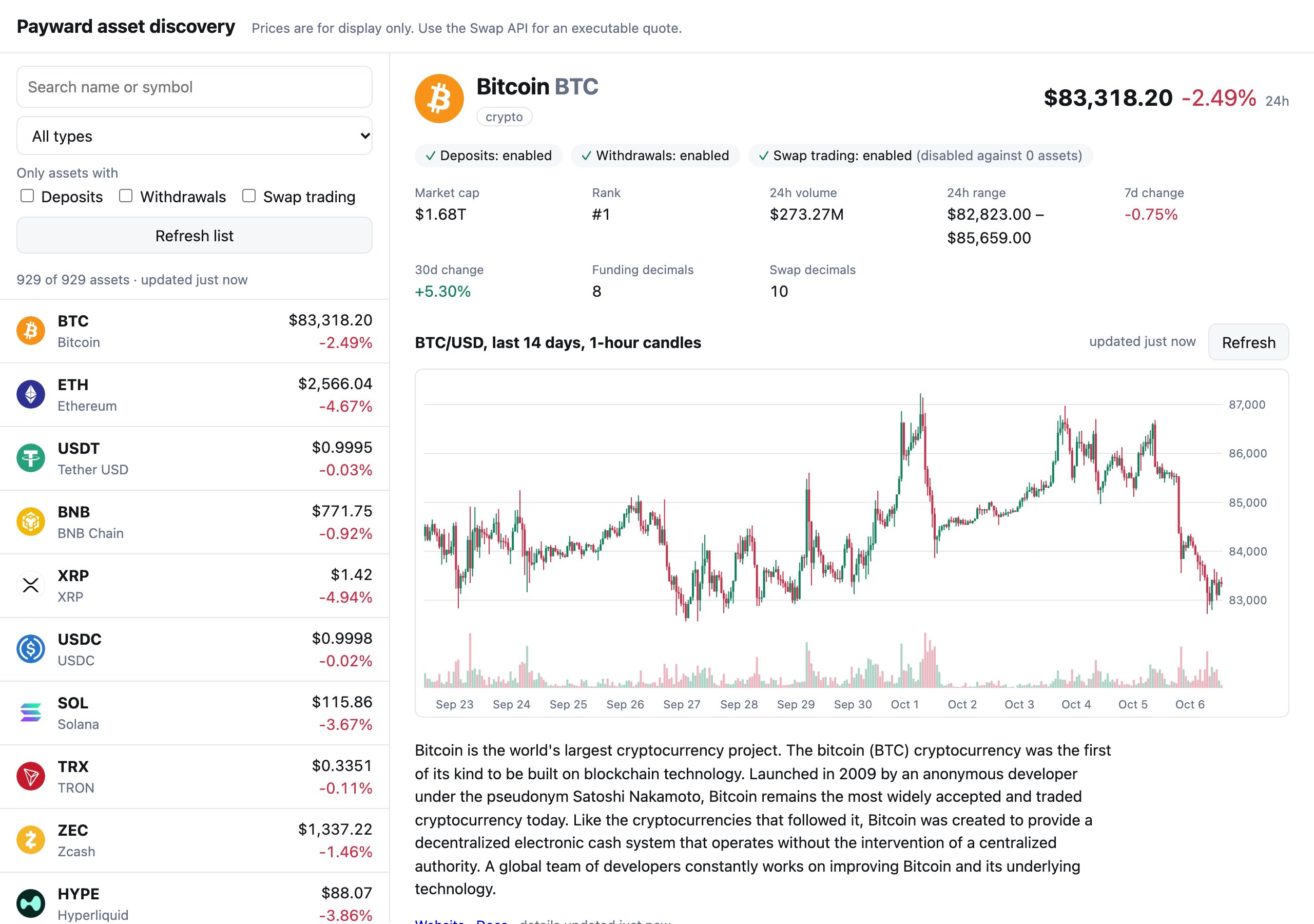
Illustrative asset detail UI
The Assets endpoints allow you to build rich asset detail pages. One asset response carries the name, logo, and description, the price with its 24-hour range and recent changes, market cap and rank, and whether deposits, withdrawals, and swaps are enabled. Add candles from List asset rates (GET /v1/assets/{asset_type}/{asset_symbol}/rates), and you have a price chart.
Mapping features to data and endpoints
Build your features around your cached asset catalog. Each one shows a different slice of the asset data, and each slice changes at its own pace:Choose the right endpoint
Asset prices and rates are for display. Use the Swap API for an executable
price.
Implementing asset features reliably
Identify assets by type and symbol
Every asset-specific endpoint takes bothasset_type and asset_symbol in the path. Store and compare assets as that pair, for example crypto/BTC, not as a bare symbol.
- Keep
typenext tosymbolin your data model, URLs, and cache keys. - URL-encode path segments. Some symbols contain characters such as
.or_. - Pass the
symbolandtypefrom the list response to later calls. Don’t rebuild them from display names.
Refresh the catalog with one paginated list
Don’t call Get asset (GET /v1/assets/{asset_type}/{asset_symbol}) once per asset to refresh your catalog. The list response already includes each asset’s metadata, market data, and status. With page_size=100, a full catalog of about 1,000 assets takes about 10 calls, instead of one call per asset.
Follow next_page_token until the response omits it. Treat the token as opaque, and fetch pages one after another.
- Use a
page_tokenonly with the exact query that produced it. Don’t reuse it after you change a filter, the sort order, or the quote asset, and don’t store it for later. - Collect all pages into a new list and swap it in when it’s complete. If you update the visible list page by page, an asset can appear twice or disappear while you load.
- Filter on the server when it helps, with
type,deposit,withdraw, andswap_trading. Filter in your app when you need instant search, since the full list is small enough to hold in memory.
Cache on your backend
The Assets API sendsCache-Control: no-store, so browsers and CDNs won’t cache responses for you. Refresh each kind of data on its own schedule in your own cache, and share that cache between users by calling the API from your backend.
- Cache per
countryandquote_symbol. Availability depends on the country, and every price is in the requested quote currency. - Re-check availability when the user acts. A list loaded five minutes ago is fine for browsing. Before you create a deposit address, list withdrawal methods, or start a swap, call Get asset (
GET /v1/assets/{asset_type}/{asset_symbol}) again and check itsstatus. Still handle an error from the action endpoint, because availability can change between the two calls. - Keep the last good data when a refresh fails. Keep showing the previous list and retry later instead of emptying the screen.
Handle missing fields
Many fields are optional, and which ones are present differs by asset. In a typical catalog, a sizable share of assets have noprice, market_cap, or description, and supply is absent for fiat assets.
- Check that a field is present before you use it. A missing
pricemeans “unavailable”, not zero. - Render a neutral placeholder such as an em dash, and don’t hide the asset unless your product requires a price.
- Treat
logo,name,symbol,type,status, anddecimalsas always present, and build your list rows only from those. - Don’t assume an asset with a
pricehas price history. See Handle missing history.
Treat numbers as decimal strings
Prices, volumes, and supplies are decimal strings, so they arrive with full precision. Converting them to floating-point numbers can round them.- Parse with a decimal library for any calculation. Convert to a floating-point number only to draw a chart or format a label.
- Validate amounts against the asset’s precision.
decimals.fundingis the number of decimal places allowed for deposits and withdrawals, anddecimals.swapis the number allowed for swaps. - Use one quote asset, set by
quote_symbolandquote_type, on every call that feeds the same screen. The responses echo it, so you can assert that they match.
Show price history with candles
For a chart, call List asset rates (GET /v1/assets/{asset_type}/{asset_symbol}/rates) with an explicit window and interval. For example, a request for one-hour candles (interval=PT60M) over the last 14 days returns 336 candles. For a line chart, plot each candle’s close price in timestamp order. For a candlestick chart, use open, high, low, and close. The newest candle’s close is the chart’s latest point. To show what the asset trades at right now, use price from Get asset (GET /v1/assets/{asset_type}/{asset_symbol}): the last traded price.
- Use exact interval values.
intervalis an ISO 8601 duration:PT1Mis one minute,PT4His four hours, andP1Dis one day. The API accepts these values exactly as written:PT1M,PT5M,PT15M,PT30M,PT60M,PT4H,P1D,P7D, andP15D. SendPT60Mfor hourly candles. - Set the window explicitly. Send a window start (
start_timestamp) and end (end_timestamp), so you get the same candles regardless of the API’s defaults. - Page through every result. Request
page_size=100, then follownext_page_tokenuntil it is absent, even if a page comes back empty. That’s four requests for the 14-day, one-hour window. - Stay under the history limit. History is limited to the most recent 5,760 candles, so pick an interval that keeps
window ÷ intervalbelow that number. One-minute candles reach back about four days. Hourly candles reach back about eight months. - Know that the newest candle is still open.
end_timestampis exclusive. If your window includes the current interval, the last candle’sclosecan still change. - Don’t expect a full window. The series can be shorter than the requested window.
Refresh only the newest candle
Completed candles never change, so don’t download the whole window again. Keep your stored candles, then request from the newest one onward. The window start,start_timestamp, is inclusive, so the response starts with that candle again, now with its latest values. Replace it and append the rest.
Handle missing history
Not every asset in the catalog has price history. Expect these cases, and let the page render without a chart:- No candles. Even for an asset that has a
price, every page of a window can come back empty. Show “No price history” instead of an empty chart. - An error from
/rates. List asset rates can return404, or a server error, for an asset that the list returned. Don’t retry a404. Retry a5xxa few times with backoff, then show the asset without a chart. - The quote asset itself. Don’t request
USDpriced inUSD. Skip the chart when the asset is the quote asset.
Handle errors and rate limits
Every error response has the same shape:- Retry only what can succeed. Retry
408,429,500,502,503, and504with exponential backoff and jitter, and cap the number of attempts. Don’t retry other4xxresponses. Fix the request instead. - Back off on
429. If the response includes aRetry-Afterheader, wait at least that long before you retry. Otherwise, use exponential backoff. - Set a request timeout. Abort requests that take longer than about 10 seconds, then retry them with backoff.
- Log
instance. It matches theX-Trace-Idresponse header and identifies the request. Include it when you contact Payward support. - Make every parameter explicit. Send the country, quote asset, and interval on every request instead of relying on defaults, so the same code gives the same result tomorrow.
- Spread scheduled jobs. Run catalog refreshes on a schedule, not on every page view, and serve your users from your cache.
Migrating from the legacy Embed API to the Assets API
If you have used the legacy Embed API’s asset endpoints, the Assets API gives you the same catalog, market data, and price history with far fewer calls. The biggest change is the refresh pattern: replace per-asset requests with one paginated list. Candles also give you open, high, low, and volume for every price point. The tables below map each request parameter and response field.Requests
Response fields
Responses wrap data indata instead of result. The list returns data as an array instead of result.assets.
To keep downstream code unchanged while you migrate, map each asset back to the Embed shape in one place:
Related
- Assets API guide: the step-by-step discovery workflow.
- List assets, Get asset, and List asset rates: the API reference.
- Deposits and withdrawals: continue from a selected asset to a payment.
- Swap: get an executable price instead of a display price.